Risk disclosure: Independent research finds 70–84% of Polymarket traders lose money (Sergeenkov, April 2026; Akey et al., SSRN, March 2026). Forex CFDs: 70–85% retail loss rate. Binary options: 80%+ in most jurisdictions. AI agents don't change these baselines. Full disclaimer. Security context: Three critical CVEs disclosed in OpenClaw in Q1 2026 (CVE-2026-25253, CVE-2026-32922) plus the ClawHavoc supply-chain attack (1,184 malicious skills). Always run v2026.4.12 or later. Full security assessment.
This is the complete guide to running an OpenClaw bot on Polymarket. By the end you'll have a paper-trading bot live on the Polymarket CLOB, with proper guardrails (position size capped, daily loss kill-switch, no withdrawal-enabled keys). Total time: about 90 minutes if you already have OpenClaw installed, 2 hours if starting fresh.
We assume you've read what Polymarket is and whether OpenClaw is safe. Skip those at your peril. This is a procedural guide, not an introduction.
TL;DR — The 30-second answer
- Install
polyclawskill from ClawHub. Audit the SKILL.md first. - Create a fresh MetaMask wallet on a fresh browser profile. Funded only with paper-trade USDC.
- Set hard guardrails: 1% position size, 5% daily loss, kill switch.
- Run paper for 2–4 weeks. Log every trade. Review weekly.
- Only then fund with real USDC, single market type at first.
- Never enable wallet withdrawal permissions from the bot side.
The architecture
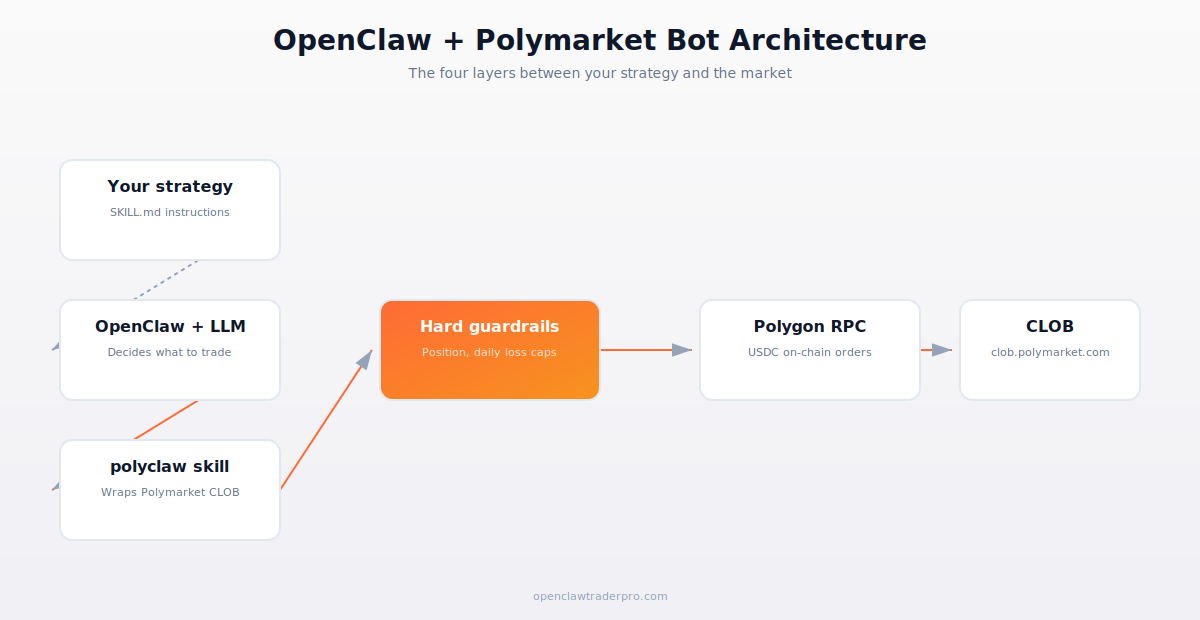
Your strategy lives in a SKILL.md file. OpenClaw plus the LLM interpret the strategy and decide what trades to attempt. The polyclaw skill wraps Polymarket's CLOB API. Hard-coded guardrails sit between the LLM's decisions and the actual order placement — they enforce position size, daily loss limits, and kill-switch behavior. The final layer is the Polymarket CLOB itself, which executes orders on-chain via Polygon.
The reason this architecture matters: guardrails must not depend on the LLM. The LLM is creative and that's a feature for strategy, but it must not be trusted to enforce its own limits. Multiple documented hallucination cases show LLMs sizing positions outside instruction when context goes long.
Step 1 — Prerequisites
- OpenClaw v2026.4.12 or later installed on isolated VPS. See install guide.
- A fresh MetaMask wallet (new seed phrase, never used before). Save the seed offline on paper. Not in 1Password, not in iCloud Keychain, not in a digital file.
- 5 USDC on Polygon as test capital. Bridge from Ethereum via the Polygon Portal, or get a fresh allocation via on-ramp.
- Telegram bot token + chat ID for alerts. We'll use this for trade notifications and heartbeat.
- An LLM API key: Anthropic Claude (recommended), OpenAI GPT-5, or DeepSeek V3.2 for cheap testing.
Step 2 — Install polyclaw
clawhub install polyclaw. But first, read the SKILL.md. Open https://github.com/openclaw/skills-polyclaw/blob/main/SKILL.md in your browser. Apply our 4 red-flag audit: no pipe-to-shell, no SSH key reads, no hardcoded IPs, no obfuscation. The skill is in the official openclaw GitHub org, which is the highest trust signal we have.
After install, configure with your fresh wallet: openclaw config set polyclaw.wallet_address 0x.... Don't paste your seed phrase — polyclaw signs orders using a key file you provide separately. We'll get to that.
Step 3 — Provide signing key safely
polyclaw needs your wallet's private key (not seed phrase) to sign orders. This is the most security-sensitive part of the entire setup. The key should:
- Live in a separate file at
~/.openclaw/secrets/polyclaw.key, mode 600. - Belong to a wallet that holds ONLY working capital — never the same wallet as your main holdings.
- Be set via env var or file, never in chat or in the SKILL.md.
- Be backed up separately (paper, offline), but never stored in any cloud service or password manager that has been logged into a compromised browser.
If this key is exfiltrated, your wallet is drained. Treat it like ATM PIN + bank password + house key combined. Audit your VPS access regularly. Rotate the wallet (move funds to a fresh one) if you suspect any compromise.
Step 4 — Set guardrails (the critical step)
Create a workspace-scoped SKILL.md that wraps polyclaw with hard limits. Save as ~/.openclaw/workspaces/polymarket-paper/skills/safe-poly-trade/SKILL.md:
---
name: safe-poly-trade
description: "Place Polymarket orders with hard position size and daily loss caps."
trigger: "trade polymarket|buy yes|buy no"
permissions:
  - network
---
Before any order:
1. Compute today's cumulative P&L by querying polyclaw.daily_pnl().
2. If P&L < -5% of starting_capital, REFUSE the order. Log to telegram.
3. Compute requested position size. Cap at min(0.02 * capital, requested_size).
4. Place order via polyclaw.place_order(...).
5. Notify telegram on placement and on fill.
If the order is for >5 USDC, ALSO require user confirmation in chat before placing.
The key insight: the cap math is in the prompt, but the LLM will execute it. Add belt-and-suspenders by configuring polyclaw.max_order_size_usdc=5 in your config. Now even if the LLM tries to size up, polyclaw rejects.
Step 5 — Required capital
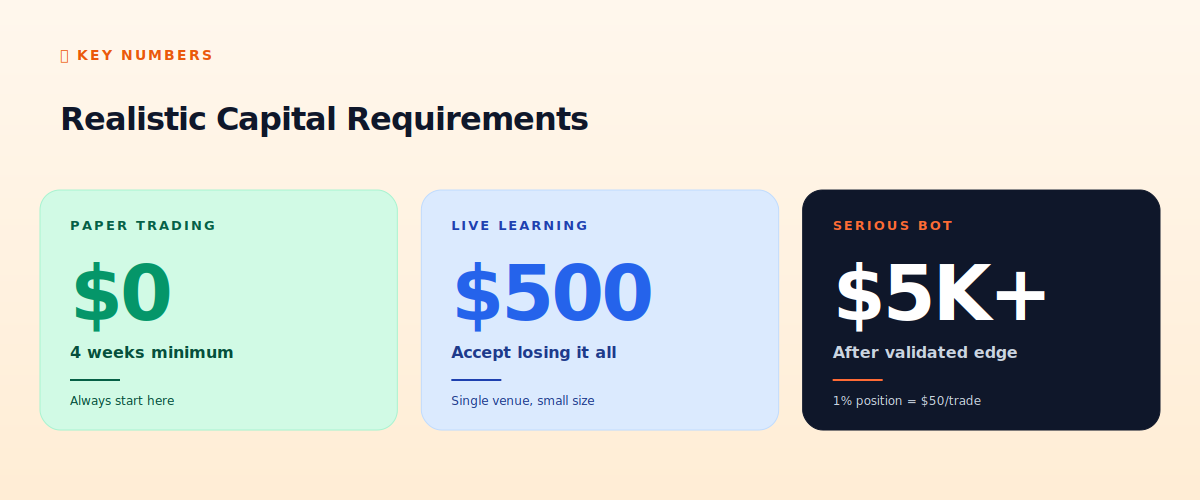
For paper trading you need zero capital. Polymarket doesn't have an official testnet, so simulate by writing trades to a log file instead of placing them. The polyclaw skill has a paper_mode flag — enable it during testing.
Once you're ready for live capital: $500 maximum for the first month. Accept that you might lose all of it. The goal at this stage is to confirm the strategy works in production with real fills and real slippage, not to make money.
After 30 days of profitable live trading with the $500 wallet, you can size up. Standard progression: $500 → $2,000 → $5,000 → $20,000+. Move up only after the previous tier has been demonstrably profitable for at least 30 days. Many traders skip this discipline and lose accounts.
Step 6 — Run paper trades for 2-4 weeks
Two to four weeks of paper trading surfaces almost all the issues that kill live bots. What to look for:
- Latency between LLM decision and order placement. If this exceeds 3 seconds reliably, the strategy may not be viable.
- Strategy decisions that don't match strategy intent. Hallucination cases — the LLM did something weird. Patch the prompt.
- Repeat failures. Same error happening daily means a configuration issue, not bad luck.
- Performance. Is the strategy actually profitable in paper? Most aren't. Most curve-fit backtests fail forward-test.
Step 7 — Going live, carefully
After successful paper trading, flip paper_mode to false. Start with the smallest position sizes — 1% of $500 = $5 per trade. Run for a week. If profitable, continue. If losing, investigate before scaling.
Daily routine (10 minutes):
- Check Telegram for last 24 hours of alerts.
- Open Polymarket UI, verify positions match what the bot logged.
- Check daily P&L on chain (Polygonscan) and compare to bot's record.
- Note any divergence. Investigate if any.
- Review one randomly-selected trade by hand. Read the LLM's reasoning. Decide if it was a good trade.
What can (and will) go wrong
- Polygon RPC fails. Use a paid RPC (Alchemy free tier is generous) instead of the public ones. Public RPCs throttle bots.
- Wallet runs out of USDC. Set a low-balance alert. Refund manually from cold storage.
- LLM hallucinates a market. Sometimes it picks a market that doesn't exist or has bad parameters. The polyclaw skill should validate the slug before placing.
- Trade gets stuck unfilled. Polymarket orders expire after 24 hours by default. Set tighter expiries on directional bets.
- Market gets disputed at resolution. Rare but possible. Funds locked until UMA vote concludes (usually 48 hours).
📧 Get every new tutorial in your inbox
One email per week. Tutorials, CVE disclosures, broker updates. Unsubscribe in one click.
(Connect FluentCRM / ConvertKit / Beehiiv form here)
Frequently asked questions
How much profit is realistic?
If you have an edge: 10-30% per month is the documented range for the consistently profitable traders. If you don't have an edge, 0% to -100% is the range. The harsh truth is that most don't.
Can I run multiple strategies?
Yes, use separate workspaces. Each workspace has its own wallet, its own polyclaw config, its own guardrails. Don't mix strategies in one wallet.
What if my bot stops trading?
The heartbeat check (every 60 minutes) should ping Telegram. If you stop getting heartbeats, ssh in and investigate. Usually the LLM API key has rate-limited or the RPC has timed out.
Should I trade on US elections?
Politics markets are dominated by retail emotion, less by structural edge. If you have specific domain expertise, possible. If you're trading on tweets, you're providing exit liquidity to bots.
Can I scale this to $100K+?
Yes mechanically, but the documented top traders are at $20K-$100K positions, not $1M. Above $100K you start moving markets — your own trades create the slippage.
What to read next
- Polymarket Explained: What It Is, How It Works
- The $437K Polymarket Trader: Strategy Breakdown
- Polymarket Weather Bots: How They Actually Work
- The 12-Point OpenClaw Hardening Checklist
Sources cited: The Hacker News (CVE-2026-25253 disclosure, Feb 2026); Conscia 2026 OpenClaw Security Crisis advisory; Snyk ToxicSkills study; Cyber Press ClawHavoc reporting; Wall Street Journal Polymarket profitability analysis (May 2026); Andrey Sergeenkov via The Defiant (April 2026); Akey, Grégoire, Harvie & Martineau, SSRN paper (March 2026); openclaw.ai official advisories; Peter Steinberger public statements on X. polyclaw skill documentation; Polymarket CLOB API docs; on-chain Polygonscan verification.