Security context: Three critical CVEs disclosed in OpenClaw in Q1 2026 (CVE-2026-25253, CVE-2026-32922) plus the ClawHavoc supply-chain attack (1,184 malicious skills). Always run v2026.4.12 or later. Full security assessment.
Installing OpenClaw takes about 15 minutes if you have Node.js and Python already, or about 30 minutes if you're starting from a fresh machine. This guide covers macOS, Windows (via WSL2), Ubuntu Linux, and Raspberry Pi 5 — the four platforms we've tested ourselves. We use v2026.4.12 as the reference version because it's the first release with both the January CVE-2026-25253 patch and the March CVE-2026-32922 patch baked in.
If you're a complete beginner: read What Is OpenClaw? first. If you're impatient, scroll to the section for your platform and follow the steps verbatim. Everything else in this guide is context for when something breaks — and something usually does.
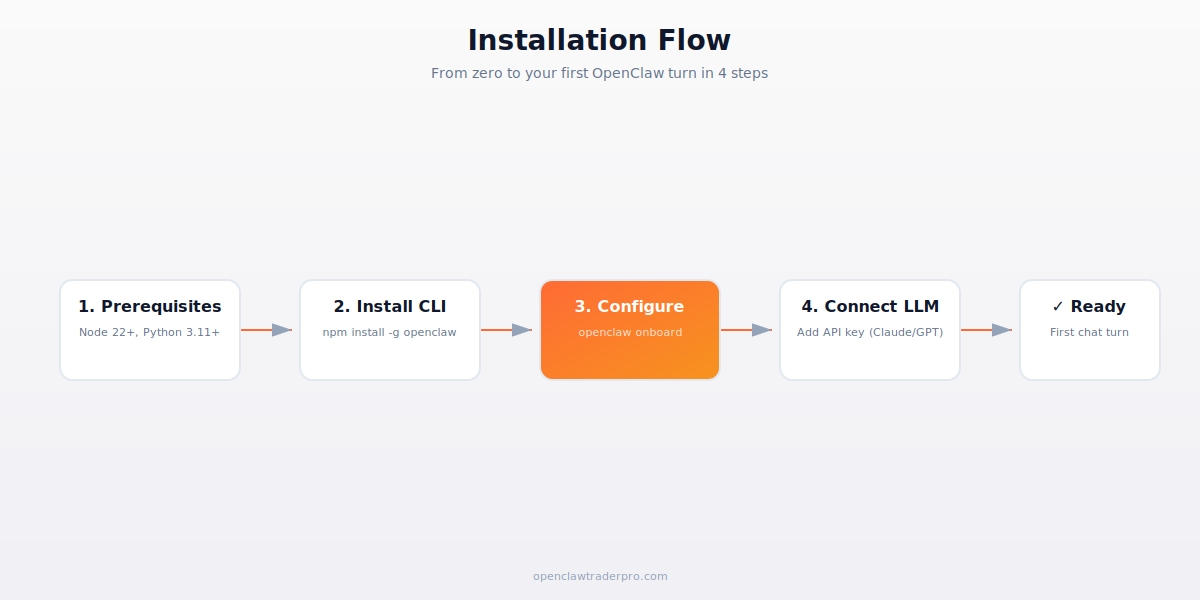
TL;DR — The 30-second answer
- Requirements: Node.js 22 LTS+, Python 3.11+, 4GB RAM minimum, ~2GB disk.
- Install command:
npm install -g openclaw@latest(15 seconds). - Configure: run
openclaw onboardand follow prompts (5 minutes). - Connect an LLM: paste your Anthropic, OpenAI, or DeepSeek API key.
- First chat:
openclaw chatand you're talking to your agent. - Total time from zero: 15–30 minutes depending on platform.
Pick your platform
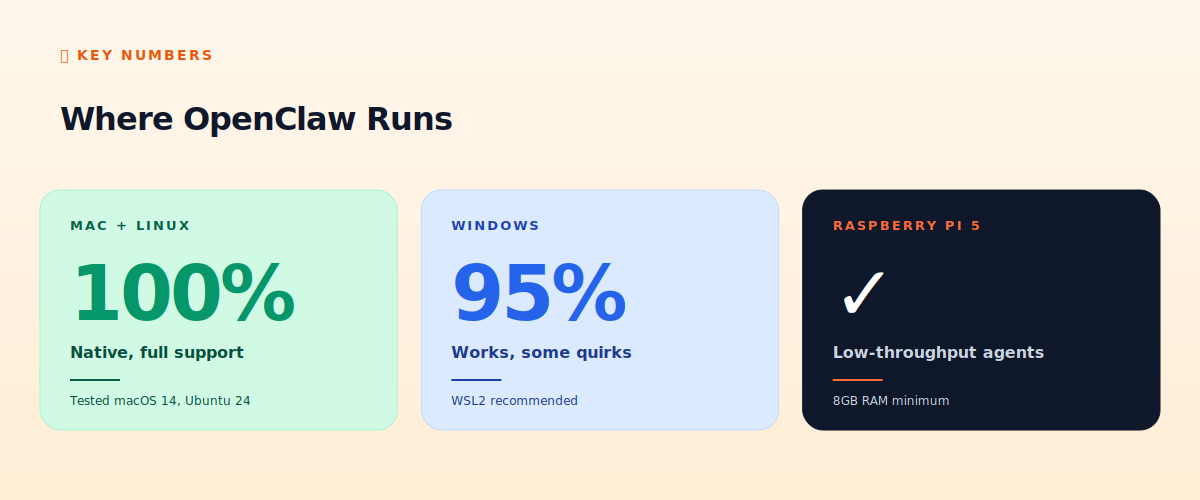
OpenClaw is officially supported on macOS 13+, Windows 10/11 (via WSL2), and modern Linux. It also runs on Raspberry Pi 5 with 8GB RAM — useful for low-throughput agents you don't need to keep on a paid VPS. We do not recommend running OpenClaw on Windows without WSL2: most skills assume a POSIX shell, and you'll spend more time debugging path issues than trading.
Step 1 — Prerequisites
You need Node.js 22 LTS or newer (Node 20 also works but is approaching end-of-life), Python 3.11 or newer, and Git. The easiest way to install these depends on your OS:
macOS
Install Homebrew first if you don't have it, then in Terminal: brew install node@22 python@3.12 git. Verify with node --version (should print v22.x or later), python3 --version (should print 3.11+), and git --version.
Ubuntu / Debian Linux
Use NodeSource for a current Node: curl -fsSL https://deb.nodesource.com/setup_22.x | sudo -E bash - then sudo apt install -y nodejs python3 python3-pip git build-essential. The build-essential package is required for skills that compile native dependencies.
Windows (via WSL2)
Open PowerShell as Administrator and run wsl --install Ubuntu-24.04. Reboot. Open the Ubuntu app from Start, set a password, and then follow the Ubuntu instructions above. Don't try to install OpenClaw directly in PowerShell — the path-mangling and permission issues will eat your weekend.
Raspberry Pi 5
Use Raspberry Pi OS Lite 64-bit. Update first (sudo apt update && sudo apt upgrade), then install Node 22 via NodeSource and Python via apt. Performance is fine for monitoring agents but expect 4–8 second LLM turn times on the Pi itself; better to keep the Pi as a local gateway and call cloud LLMs.
Step 2 — Install OpenClaw
One command:
npm install -g openclaw@latest
This installs the openclaw CLI globally. On macOS/Linux you may need sudo depending on your npm configuration; if you've set up ~/.npm-global properly you don't. Total install takes 10–30 seconds.
Pin the version. In production we recommend npm install -g openclaw@2026.4.12 instead of @latest, so unexpected updates don't break your running bots. Subscribe to github.com/openclaw/openclaw/security/advisories and update manually within 24 hours of any critical CVE.
Step 3 — Onboarding
Run openclaw onboard and it walks you through the rest. The wizard asks for: (1) your preferred LLM provider (Anthropic, OpenAI, Google, DeepSeek), (2) the API key, (3) which channels you want to enable (terminal alone is fine to start, add WhatsApp/Telegram later), and (4) the default workspace name.
At the end you'll have a folder at ~/.openclaw/ with subdirectories for memory/, skills/, workspaces/, and a config.json. Back this folder up — it's the entire state of your agent.
Step 4 — Your first chat turn
From any directory, run openclaw chat. You'll get a REPL. Type something like:
What's the current BTC price?
OpenClaw will spin up an LLM turn, the LLM will ask to use a tool (probably a web fetch or a skill if you have CCXT installed), and you'll get an answer in 2–5 seconds. If you don't have any trading-related skills installed yet, the LLM will tell you so — that's expected.
Install your first skill: clawhub install ccxt. Audit the SKILL.md before you run it (cat ~/.openclaw/skills/ccxt/SKILL.md). If you see anything that looks like the red flags in our malicious-skill guide, abort — though CCXT is a known-safe community-audited skill.
Common installation problems
"npm install" fails with permission errors
Don't use sudo npm install -g — that creates a maintenance nightmare. Instead, configure npm to use a user-owned directory: mkdir ~/.npm-global && npm config set prefix '~/.npm-global', add export PATH=~/.npm-global/bin:$PATH to your ~/.bashrc (or .zshrc), and reload your shell.
"openclaw: command not found" after install
Your PATH doesn't include the global npm bin directory. Run npm bin -g to see where it is, then add that to your PATH. Usually ~/.npm-global/bin if you followed the above advice.
"Gateway port 18789 already in use"
Another OpenClaw process is already running. Find it with lsof -i :18789 on Mac/Linux or netstat -ano | findstr 18789 on Windows, then kill it. Or change the port in ~/.openclaw/config.json — just remember to never expose it to the internet.
LLM responds slowly (>10 seconds per turn)
Either you're on a slow connection, the LLM provider is rate-limiting you, or you have too many skills loaded. Check ~/.openclaw/logs/ for timing info. Disable unused skills with openclaw skill disable [name].
Recommended post-install configuration
- Enable telemetry locally only:
openclaw config set telemetry.cloud false. You still want local logs. - Set a budget cap on LLM spend:
openclaw config set llm.daily_budget_usd 5. Hard-stops when exceeded. - Configure Telegram notifications for critical events:
openclaw onboard --channel telegram. - Set up automated backups: a cron job that
rsync ~/.openclaw/ user@backup:/backup/openclaw/nightly. - Pin all skill versions:
openclaw skill lockcreates askills.lockfile. Auto-update breaks things.
📧 Get every new tutorial in your inbox
One email per week. Tutorials, CVE disclosures, broker updates. Unsubscribe in one click.
(Connect FluentCRM / ConvertKit / Beehiiv form here)
Frequently asked questions
Do I need a GPU?
No. OpenClaw doesn't run the LLM locally by default — the heavy lifting happens at Anthropic, OpenAI, or your chosen provider. If you want to run a local model via Ollama, then yes, a GPU helps.
Can I install on a shared VPS?
Yes but treat it like running unsigned code. Use a dedicated user account, limit filesystem access, and never share API keys across workspaces.
How do I update?
npm install -g openclaw@latest or pin to a specific version. Always check the release notes for breaking changes — major version jumps occasionally change config formats.
Does it work offline?
The CLI works offline, but the LLM does not. You can run Ollama locally for offline LLM calls, but expect 5–15 second turn times on consumer hardware.
How do I uninstall?
npm uninstall -g openclaw removes the CLI. Delete ~/.openclaw/ to remove all data, memory, and skills.
What to read next
- What Is OpenClaw? The 2026 Beginner's Guide
- OpenClaw VPS Comparison: Hetzner vs DigitalOcean vs Vultr
- OpenClaw Skills Explained
- The 12-Point OpenClaw Hardening Checklist
Sources cited: The Hacker News (CVE-2026-25253 disclosure, Feb 2026); Conscia 2026 OpenClaw Security Crisis advisory; Snyk ToxicSkills study; Cyber Press ClawHavoc reporting; Wall Street Journal Polymarket profitability analysis (May 2026); Andrey Sergeenkov via The Defiant (April 2026); Akey, Grégoire, Harvie & Martineau, SSRN paper (March 2026); openclaw.ai official advisories; Peter Steinberger public statements on X. Official OpenClaw installation docs at clawdocs.org.