Risk disclosure: Independent research finds 70–84% of Polymarket traders lose money (Sergeenkov, April 2026; Akey et al., SSRN, March 2026). Forex CFDs: 70–85% retail loss rate. Binary options: 80%+ in most jurisdictions. AI agents don't change these baselines. Full disclaimer.
In November 2025, an Austrian developer named Peter Steinberger spent one hour with Claude and built a prototype he called "WhatsApp Relay." Two months later, the project had crossed 250,000 GitHub stars, surpassing React's 10-year record. By April 2026 it had hit 347,000 stars and become the most-starred software repository on GitHub. The project is called OpenClaw — and if you're reading this, you've probably heard about the AI trading bots it powers.
This guide is for the trader who wants to understand what OpenClaw actually is before deciding whether to use it. We'll cover the architecture in plain English, walk through what it does and doesn't do, look at the documented profits and losses, and end with an honest answer to the question every beginner asks: is it worth my time?
TL;DR — The 30-second answer
- OpenClaw is a free, open-source AI agent framework — not a trading platform, not a SaaS, not a token project.
- It lets you wire an LLM (Claude, GPT-5, Gemini, DeepSeek) into your computer, your APIs, and your brokers, then talk to it like an assistant.
- It's the framework behind documented Polymarket profits like $313 → $437,600 in one month — and the framework that suffered the ClawHavoc supply-chain attack with 1,184 malicious skills.
- It runs on Mac, Windows, Linux, and Raspberry Pi 5. Installation takes about 15 minutes.
- For trading specifically: it works, but it doesn't generate alpha on its own. You still need a strategy, capital management, and discipline.
What OpenClaw actually is
OpenClaw is an agent framework. That means it sits between you and a large language model and gives that model the ability to do things in the world: read files, run code, call APIs, send messages, schedule tasks. A regular chatbot can only talk. An agent can talk and act.
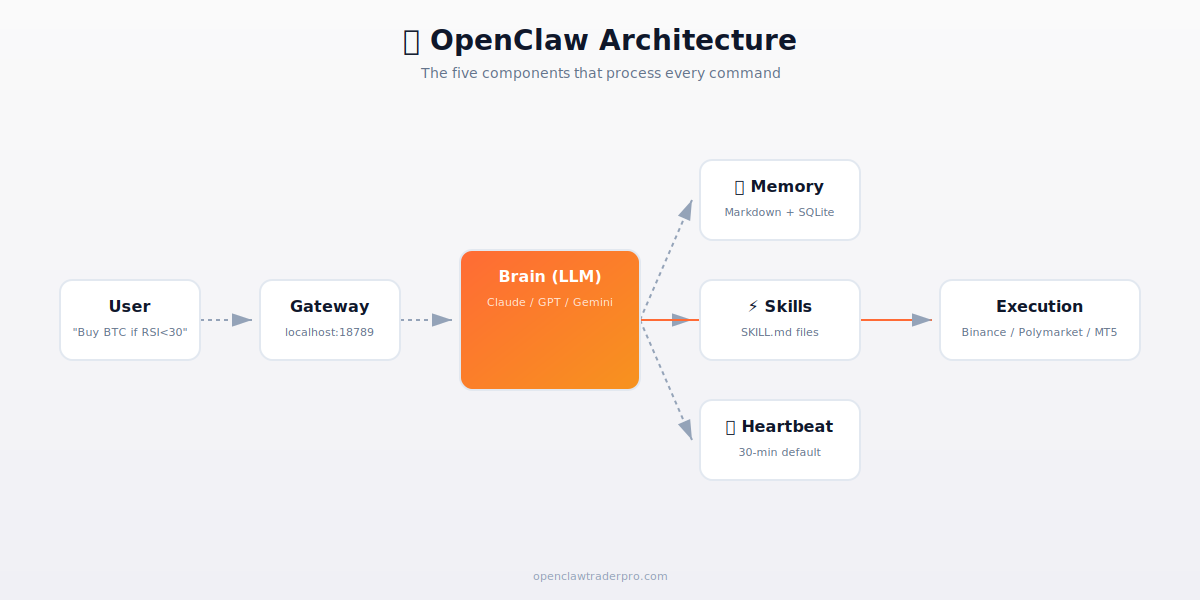
Here's the key insight that takes most beginners a few hours to internalize: OpenClaw doesn't think. The LLM does. OpenClaw is the scaffold that turns thinking into doing. When you say "buy BTC if RSI drops below 30," the LLM interprets your intent and decides the steps, but OpenClaw is what actually runs the commands, calls the broker API, and ships the order.
This distinction matters because every behavior people attribute to "OpenClaw" — the smart trades, the dumb hallucinations, the speed, the slowness — is actually a behavior of the LLM you connected to OpenClaw. Change the LLM and the behavior changes. This is also why we never recommend running OpenClaw with an LLM you don't trust for your specific task.
The five-component architecture
Gateway
The Gateway is a local WebSocket server that runs on localhost:18789. It's the front door — every message from every channel (WhatsApp, Telegram, terminal, web UI) comes through here. The Gateway includes a "lane queue" that keeps sessions ordered so two messages don't race each other.
The Gateway is also where the most serious 2026 vulnerability lived: CVE-2026-25253 let attackers steal the local auth token via a malicious link and then connect to the Gateway as if they were you. We covered the full attack chain separately — for now, just know that the Gateway is the security boundary and you should never expose port 18789 to the internet.
Brain (the LLM)
The Brain is whichever large language model you connect. OpenClaw is model-agnostic — it ships with first-class support for Anthropic Claude (Sonnet 4.6, Opus 4.7), OpenAI GPT-5 / Codex, Google Gemini 2.5 Pro, DeepSeek V3.2, xAI Grok, and any Ollama-served local model. The Brain runs a ReAct loop: read the context, reason about what to do, take an action, observe the result, repeat.
One nice touch is the Model Resolver — you can route different tasks to different models. Use cheap DeepSeek for the heartbeat that just checks "is the market open?" and expensive Claude Opus for the decision-making turn that says "should we close this position?". This pattern lets you keep monthly API costs to $30–80 instead of $300+.
Memory
Memory is stored in plain Markdown files under ~/.openclaw/memory/, indexed by an embedded SQLite database. Per-session memory holds the conversation you're having right now. Per-user memory holds long-term context: "Dan trades on Hetzner CX22, uses Polyclaw, capped daily loss at $50." Semantic snapshots compress old conversations into reusable context so the LLM doesn't have to re-read everything.
Because Memory is plain Markdown, you can edit it by hand — useful when the LLM "remembers" something wrong, or when you want to seed the agent with key facts before it starts. It's also useful for backups: the entire state of your agent is a folder you can copy to another machine.
Skills
Skills are SKILL.md files with YAML frontmatter. Each skill teaches the LLM how to do one thing — place an order on Polymarket, fetch a Binance balance, read an RSS feed. Skills can be bundled with OpenClaw (built-in), installed globally in ~/.openclaw/skills/, or scoped to a workspace. They're loaded on-demand so the model doesn't waste tokens on skills it isn't using.
Skills are distributed primarily through ClawHub, the official marketplace. As of May 2026, ClawHub hosts 13,700+ skills after the ClawHavoc cleanup — the marketplace had to remove 1,184 malicious packages in February. We have a separate guide on how to audit a SKILL.md before you install it.
Heartbeat
The Heartbeat is a proactive timer. Every 30 minutes (configurable), it fires an agent turn even if you didn't send a message. For trading, this is how monitoring loops work: every 30 minutes the agent checks market conditions, scans news, evaluates open positions, and decides if anything needs your attention. If nothing's wrong, it just responds HEARTBEAT_OK and goes back to sleep.
The history — Clawdbot → Moltbot → OpenClaw
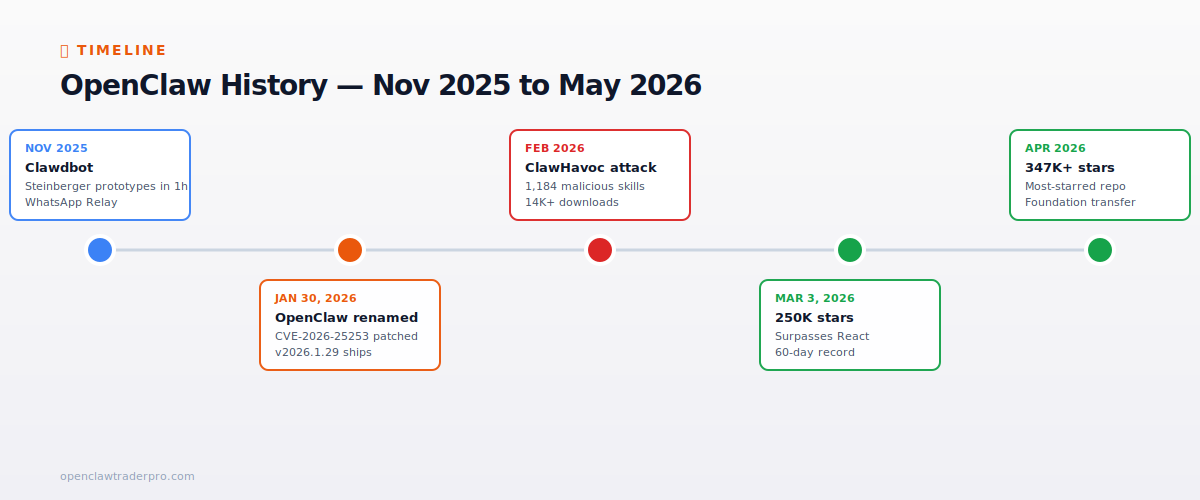
OpenClaw was born during a Vienna evening in November 2025. Peter Steinberger — a senior iOS developer best known for the PSPDFKit library — was experimenting with Claude and built a prototype that let him chat with his computer through WhatsApp. He called it WhatsApp Relay, posted a screenshot, and went to bed. By morning the post had hundreds of replies asking for the code.
Over December and January the project went through two rapid renames. First it became Clawdbot — a play on Claude plus bot. Then in late January 2026, Anthropic's legal team raised a trademark concern, and the project became Moltbot (a molt is what a crustacean does when it grows new shell). Three days later, on January 30, 2026, the project was renamed one final time to OpenClaw, with the lobster emoji 🦞 as the unofficial mascot.
That same day, security researcher Mav Levin of depthfirst disclosed CVE-2026-25253 — the 1-click RCE we mentioned earlier. The team shipped v2026.1.29 within 24 hours to patch it, setting a precedent for fast security response that the project has tried to maintain since.
February brought ClawHavoc — a coordinated supply-chain attack that flooded ClawHub with 1,184 malicious skills before it was caught. Steinberger joined OpenAI on February 14, raising eyebrows about whether the project could remain neutral. In March, OpenClaw passed 250,000 GitHub stars (surpassing React's 10-year record in 60 days) and then 302,000 in April, after which the project was transferred to an independent foundation modeled on the Ghostty foundation.
What can OpenClaw actually do?
For traders specifically, here are the seven things OpenClaw is unambiguously good at:
- Monitor markets and alert you — heartbeat-driven price and volume checks with Telegram pings when conditions trigger. This is the lowest-risk, highest-leverage use case.
- Execute trades — via skills that wrap broker APIs (Binance, Bybit, OKX, Polymarket, MT5, Deriv).
- Read research and summarize — earnings reports, central bank statements, on-chain data, regulatory filings.
- Backtest strategies — via skills that wrap CCXT, Microsoft's Qlib, or custom backtesting libraries.
- Manage multiple accounts — separate workspaces for different strategies, wallets, or brokers.
- Generate code — write SKILL.md files for new venues, Python scripts, MQL5 for MetaTrader, Pine Script for TradingView.
- Audit logs — read every trade you placed in the last month, summarize patterns, flag anomalies, surface drawdowns.
What it can't do, despite what the YouTube ads claim:
- Generate alpha. The LLM is not smarter than the market. If a strategy doesn't have an edge before you add AI, adding AI doesn't create one.
- Avoid slippage. Latency is dominated by LLM inference, which takes 1.5–3 seconds per turn. Sub-100ms execution venues will beat you on arbitrage every time.
- Replace risk management. If you don't hard-code position sizing and a daily loss limit, the LLM will eventually let you down. Document hallucination cases on Polymarket show this clearly.
- Prevent hallucinations. Multiple documented cases of LLMs misinterpreting news or social media and placing wrong trades. Hard-coded guards are non-negotiable.
The documented profits (and the losses you don't hear about)
The viral success stories are real. They're also wildly unrepresentative. Both things can be true.
Verified profit cases with named on-chain accounts:
- Account 0x8dxd (Polymarket): $313 turned into $437,600 in one month, 98% win rate across 6,615 predictions. Source: Finbold, January 6, 2026.
- Account Bidou28old (Polymarket): $116,280.60 in profit in a single 24-hour window, 52 trades, ~83% success rate. Source: Finbold, February 13, 2026.
- Polymarket weather bot (0xf2e346ab): $204 grown to roughly $24,000 across more than 1,300 trades, 73% win rate. Source: Phosphen X post, December 30, 2025.
- Hans323 (Polymarket weather): $92,632 grown to $1,018,475 on a single trade using a NOAA/Met Office forecast lag. Cumulative gains exceed $1.1M.
The aggregate reality matters more than the highlight reel. Andrey Sergeenkov's April 2026 study of 2.5 million Polymarket wallets, published via The Defiant, found 84.1% are in the red. Only 2% have ever earned more than $1,000. Only 0.033% (about 840 wallets) have ever earned more than $100,000. A Wall Street Journal analysis of 1.6 million accounts in May 2026 found just 0.1% of accounts — fewer than 2,000 wallets — captured 67% of all profits. The bottom 10% averaged a $4,000 loss per account.
The pattern is consistent across asset classes. Forex CFD broker disclosures typically show 70–85% retail loss rates. Binary options exceed 80% in most jurisdictions. Crypto futures churn through retail accounts at similar speeds. Adding OpenClaw or any other AI agent to a strategy that lacks an edge does not improve these numbers — it just makes the losses arrive faster and more consistently.
Is OpenClaw safe?
This deserves a full guide of its own, and we have one: Is OpenClaw Safe? The Honest 2026 Risk Assessment. For now, the short version:
- Three critical CVEs in 2026: CVE-2026-25253 (CVSS 8.8, 1-click RCE, January), CVE-2026-32922 (CVSS 9.9, privilege escalation, March), and a handful of medium-severity issues. All patched. Always run v2026.4.12 or later.
- ClawHavoc was real: 1,184 malicious skills in ClawHub, 14,285+ confirmed installs of the top malicious package, payloads exfiltrating SSH keys, browser cookies, and crypto wallet files. ClawHub now scans uploads through VirusTotal.
- Scam wave: a fake CLAWD token hit $16M market cap before collapsing 90%. A $5,000 CLAW airdrop phishing site drained MetaMask wallets in March 2026. OpenClaw will never have a token; treat any claim otherwise as a scam.
The bottom line for traders: OpenClaw is software written fast and at huge scale by a small core team. It will have more vulnerabilities. You must update aggressively and audit every skill you install. For live trading, use an isolated VPS, a wallet that's separate from your hardware wallet, a hard kill-switch on daily loss, and broker API keys that don't have withdrawal permissions.
Who should actually use OpenClaw for trading?
If you're a beginner with less than $1,000 of risk capital: don't deploy live capital yet. Paper trade for four weeks first. Use Kalshi (CFTC-regulated, USD-settled) before Polymarket if you're in the US. Use Deriv's demo mode if you're in SEA or Africa. Read every SKILL.md you install. The goal at this stage is to learn how the framework breaks, not to earn money.
If you have $5K–$50K and some trading experience: OpenClaw is a reasonable orchestration layer if you enforce hard-coded guardrails. Single venue, single strategy, 1–2% position sizing, daily loss kill-switch, hardware wallet on a separate machine. The goal is to avoid catastrophic blow-ups while you figure out whether the strategy works.
If you're a professional or quant: OpenClaw is your alerting and research layer, not your execution engine. Latency-sensitive fills should go through Hummingbot, Freqtrade, or your own C++/Rust low-latency stack. Use OpenClaw to issue natural-language commands, parse research, and surface alerts that don't need sub-second response.
How to actually get started
- Read first. This guide, then the security assessment, then the 30-day Start Here path. Skip the security read and you'll regret it.
- Get a VPS. Hetzner CX22 (about €4/month) or DigitalOcean droplet ($6/month) work fine. Don't run OpenClaw on the same machine as your hardware wallet.
- Install v2026.4.12 or later. Pin the version. Subscribe to security advisories at
github.com/openclaw/openclaw/security/advisories. - Install ONE skill and read its SKILL.md end-to-end. Start with
ccxtfor crypto orpolyclawfor Polymarket. Run on testnet or paper mode. - Run paper trades for two to four weeks. Log everything. Review every trade by hand. Only then decide whether to fund it.
📧 Get every new tutorial in your inbox
One email per week. Tutorials, CVE disclosures, broker updates. Unsubscribe in one click.
(Connect FluentCRM / ConvertKit / Beehiiv form here)
Frequently asked questions
Is OpenClaw free?
Yes. OpenClaw is open-source under the MIT license. Any site charging for OpenClaw access or a premium edition is third-party at best, scam at worst.
Does it work on Windows?
Yes. Mac, Windows (WSL2 recommended), Linux, and Raspberry Pi 5 for low-throughput workloads.
Which LLM should I use for trading?
Claude Sonnet 4.6 or Opus 4.7 for reasoning-heavy decisions. GPT-5 for fast scoring loops. DeepSeek V3.2 for cheap monitoring. Never let any model determine position size without hard-coded guards.
Can it really make me money?
It can execute trades quickly. Making money depends on your strategy and discipline. 70-84% of retail traders lose money regardless of tooling.
How much does it cost to run?
Hosting $5-15/month. LLM API $30-150/month depending on usage. No subscription to OpenClaw itself.
What to read next
- The 30-Day Start Here Path
- How to Install OpenClaw on Mac, Windows, Linux
- Is OpenClaw Safe? The Honest 2026 Risk Assessment
- OpenClaw Skills Explained: SKILL.md, ClawHub, Safety
- The Complete OpenClaw + Polymarket Bot Guide
Sources cited: Wikipedia OpenClaw entry; The Hacker News (CVE-2026-25253 disclosure, Feb 2026); Conscia 2026 OpenClaw Security Crisis advisory; Snyk ToxicSkills study; Cyber Press ClawHavoc reporting; Wall Street Journal Polymarket profitability analysis (May 2026); Andrey Sergeenkov via The Defiant (April 2026); Akey, Grégoire, Harvie & Martineau, SSRN paper (March 2026); openclaw.ai official advisories; Peter Steinberger public statements on X. Finbold reporting on individual accounts; KuCoin / Investx market analysis.