Security context: Three critical CVEs disclosed in OpenClaw in Q1 2026 (CVE-2026-25253, CVE-2026-32922) plus the ClawHavoc supply-chain attack (1,184 malicious skills). Always run v2026.4.12 or later. Full security assessment.
Skills are the thing that turns OpenClaw from a chat interface into a trading tool. Without skills, you have a smart assistant that can read your messages. With skills, that same assistant can place a Polymarket order, fetch a Binance balance, or generate a Pine Script strategy for your TradingView.
Skills are also where most of OpenClaw's security incidents have happened. The ClawHavoc supply-chain attack — 1,184 malicious packages on the official marketplace — was a SKILL.md problem. So before we get to writing your own skills, we'll spend most of this guide on how to read someone else's safely.
TL;DR — The 30-second answer
- A skill is a single Markdown file with YAML frontmatter that teaches the LLM how to do one task.
- Skills live in three places: bundled with OpenClaw, in
~/.openclaw/skills/globally, or in a workspace. - ClawHub is the official marketplace. 13,700 skills as of May 2026, after 1,184 malicious ones were removed.
- Every skill should be read end-to-end before installation. Look for four red flags (pipe-to-shell, SSH key reads, hardcoded IPs, obfuscation).
- Writing your own skill takes about 30 minutes for a simple task. Use Claude or GPT to scaffold the structure.
The SKILL.md format
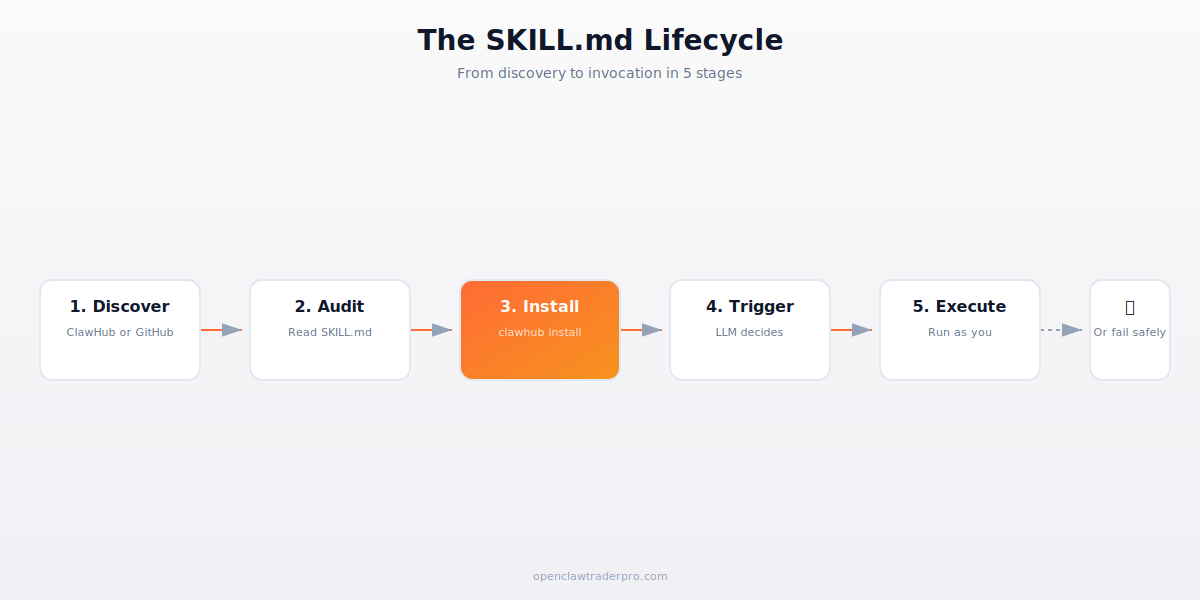
Every skill starts with the same template:
---
name: my-skill
description: "What this skill does in one sentence."
trigger: "keyword|another keyword"
permissions:
  - network
  - filesystem.read
---
(markdown instructions follow)
The YAML frontmatter tells OpenClaw three things: the skill's name (for invocation), a trigger pattern (regex or keywords the LLM watches for in user messages), and the permissions the skill needs. The Markdown body is the actual instructions the LLM follows when the skill activates.
Where skills live
- Bundled skills ship with OpenClaw itself: chat, memory, schedule. You can't disable these — they're how the framework operates.
- Global skills live in
~/.openclaw/skills/[skill-name]/SKILL.md. Installed viaclawhub install [name]or by manually cloning a repo. - Workspace skills live in
~/.openclaw/workspaces/[ws]/skills/. Only active when you're in that workspace — useful for separating trading strategies. - Per-conversation skills can be loaded dynamically by the LLM if they're available. Rarely useful in practice.
ClawHub — the official marketplace
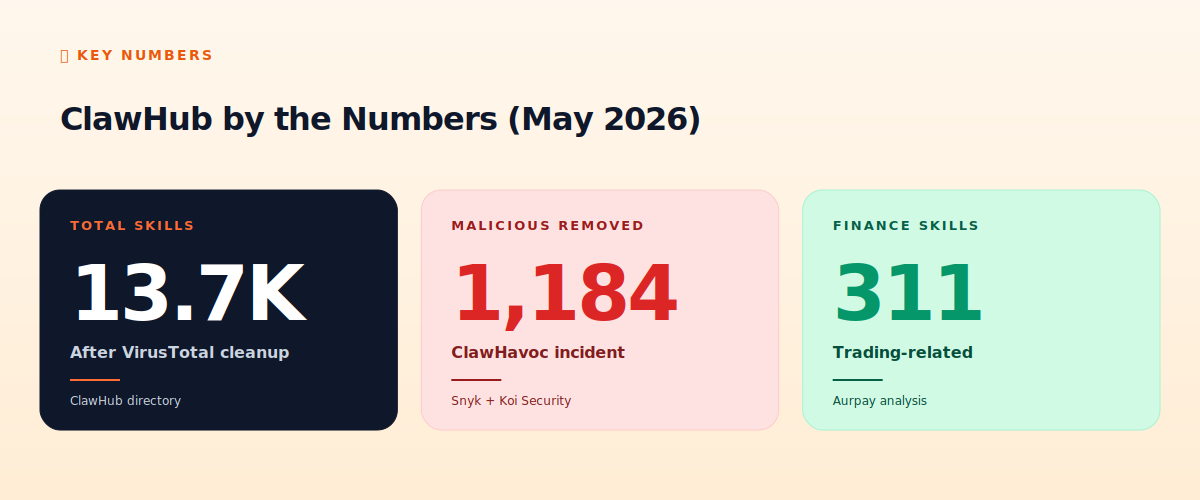
ClawHub is the official distribution mechanism. Browse at clawhub.org, install with clawhub install [name], update with clawhub update. After the February ClawHavoc attack, every uploaded skill is now scanned through VirusTotal and Snyk's static analyzer before publication. This is necessary but not sufficient — static scanners miss novel obfuscation.
The marketplace breaks down roughly: 311 trading/finance skills, 2,100 developer tools, 4,800 personal productivity, 6,500 various others. Of the trading skills, the most-installed are ccxt (crypto multi-exchange), polyclaw (Polymarket), mt5-httpapi (MetaTrader 5), and tradingview-webhook (signal ingestion).
How to audit a SKILL.md (the 60-second method)
Before you run clawhub install, do this:
- Open the SKILL.md in your browser. Click "View source" on GitHub.
- Search for the four red flag patterns (see below). If any match, abort.
- Search for URLs and IP addresses. They should resolve to known infrastructure (GitHub, npm, the broker's official domain). If you see a numeric IP, abort.
- Search for
base64,eval,exec,os.system,subprocess. If you see them, read the surrounding context carefully. - Check the GitHub stars / age of the repo. New skills (<7 days old) with high installs are suspicious — that's the ClawHavoc pattern.
The four red flags in detail (we have a full guide on this):
🚩 Red flag 1 — Pipe-to-shell. Any pattern like curl URL | bash or wget URL | sh. Legitimate skills don't fetch and execute remote scripts. If you see this, the skill is asking for arbitrary code execution. Don't install.
🚩 Red flag 2 — Sensitive file reads. A skill that reads ~/.ssh/, ~/.aws/, ~/.ethereum/, or browser profile paths. A polymarket helper has no reason to touch your SSH keys. If you see this pattern, the skill is trying to exfiltrate credentials.
🚩 Red flag 3 — Hardcoded IPs. The ClawHavoc C2 was 91.92.242.30:4444. Real integrations use domains under the broker's official infrastructure. A numeric IP plus a non-standard port is almost always a beacon.
🚩 Red flag 4 — Obfuscated commands. Patterns like base64 -d, xxd -r, hex escapes, exotic $IFS manipulation, or hex/octal arithmetic on command names. If you can't read it at a glance, don't run it.
Writing your own skill
For your first custom skill, pick something simple: a price alert that fires when BTC drops below $X. Here's the structure:
---
name: btc-alert
description: "Send a Telegram message when BTC drops below a threshold."
trigger: "btc alert|bitcoin alert"
permissions:
  - network
---
When invoked, fetch the current BTC price from CoinGecko. If price < threshold (default $80,000), send a Telegram message to my chat. If price >= threshold, respond with current price.
Save this as ~/.openclaw/skills/btc-alert/SKILL.md. Restart OpenClaw. Now when you say "send me a BTC alert if it drops below 75000," the LLM picks up the trigger, reads the skill, and executes the instructions. If you have a telegram skill installed, it'll use that to send the message.
This is the magical part of OpenClaw: writing automation in plain English. The LLM does the work of figuring out which APIs to call and how to chain them. For more complex strategies, you can include code snippets directly in the SKILL.md and the LLM will execute them as-is.
Sharing your skills
To publish to ClawHub: create a GitHub repo with your SKILL.md, README, and any helper scripts. Submit to ClawHub via their CLI: clawhub publish github.com/yourname/btc-alert. They'll run static analysis, scan via VirusTotal, and (currently) review manually before listing.
Before publishing: assume your skill will be installed by someone who doesn't read code. Document permissions explicitly. Don't fetch from URLs the user didn't approve. Don't read files outside the workspace. The bar for community skills should be "a person with $0 of crypto-OSPI training can install this safely."
📧 Get every new tutorial in your inbox
One email per week. Tutorials, CVE disclosures, broker updates. Unsubscribe in one click.
(Connect FluentCRM / ConvertKit / Beehiiv form here)
Frequently asked questions
How many skills can I have installed?
Practical limit is around 50–100 before LLM context window gets tight. OpenClaw only loads skills whose triggers match, so installing 30 doesn't slow down everyday use.
Can a skill modify other skills?
Yes, with filesystem.write permission. This is dangerous — a malicious skill could trojan other skills. Don't grant filesystem.write to skills you haven't audited.
How do I delete a skill?
clawhub uninstall [name] or just rm -rf ~/.openclaw/skills/[name]/. No clean uninstall on filesystem — safe to delete manually.
What if a skill stops working after an OpenClaw update?
Check the skill's repo for an updated SKILL.md format. Skills are versioned but auto-updates are off by default — you have to clawhub update [name] explicitly.
Can I run multiple versions of a skill?
Yes via workspaces. ~/.openclaw/workspaces/v1/skills/ccxt and ~/.openclaw/workspaces/v2/skills/ccxt are independent. Useful for A/B testing strategies.
What to read next
- How to Spot a Malicious SKILL.md in 60 Seconds
- ClawHavoc: 1,184 Malicious Skills Exposed
- Building Your First OpenClaw Skill
- What Is OpenClaw?
Sources cited: The Hacker News (CVE-2026-25253 disclosure, Feb 2026); Conscia 2026 OpenClaw Security Crisis advisory; Snyk ToxicSkills study; Cyber Press ClawHavoc reporting; Wall Street Journal Polymarket profitability analysis (May 2026); Andrey Sergeenkov via The Defiant (April 2026); Akey, Grégoire, Harvie & Martineau, SSRN paper (March 2026); openclaw.ai official advisories; Peter Steinberger public statements on X. clawhub.org marketplace; Snyk ToxicSkills detailed report; Koi Security ClawHavoc analysis.