Affiliate disclosure: Links to brokers (Exness, Deriv, Binance, Bybit, OKX, IQ Option, Pocket Option, Quotex) may earn us a referral commission. Your costs don't change. Our ratings don't either. Risk disclosure: Independent research finds 70–84% of Polymarket traders lose money (Sergeenkov, April 2026; Akey et al., SSRN, March 2026). Forex CFDs: 70–85% retail loss rate. Binary options: 80%+ in most jurisdictions. AI agents don't change these baselines. Full disclaimer.
MT5 (MetaTrader 5) is the dominant forex trading platform globally. Almost every regulated forex broker offers MT5 access, and the platform has a robust Expert Advisor (EA) system for automation. This guide walks through connecting OpenClaw to MT5 via the mt5-httpapi bridge skill — the standard approach for AI-driven forex bots.
Total setup time: about 45 minutes if you have an MT5 account and VPS. We use Ubuntu 24.04 on a Hetzner CX22 and run MT5 under Wine, which is the standard production deployment for forex bots in 2026.
TL;DR — The 30-second answer
- MT5 is the dominant forex platform. Every regulated broker supports it.
- OpenClaw connects via the
mt5-httpapiskill, which talks to an Expert Advisor running inside MT5. - Linux deployment: Wine + MT5 + EA + OpenClaw + nginx. Standard since 2024.
- Setup time: ~45 minutes if VPS and broker account are ready.
- Always demo account first. Live broker switching is one config change.
- Hard guardrails: 1% lot size cap, 5% daily loss kill, no-trade windows for news.
Why MT5 needs a bridge
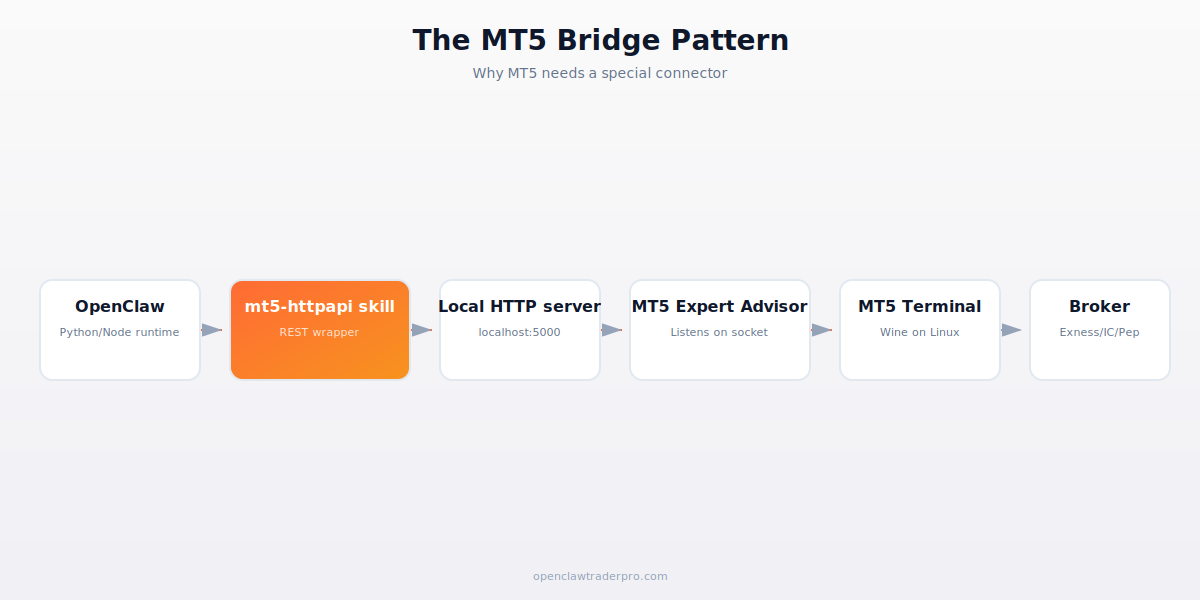
MT5 is a Windows application that doesn't expose a REST API by default. Its only programmable interface is MQL5 — the proprietary language used to write Expert Advisors (EAs) that run inside the MT5 terminal. To connect OpenClaw (Python/Node) to MT5, you need a small EA that listens on a local HTTP port and translates between MT5's internal MQL5 calls and your bot's HTTP requests.
The mt5-httpapi skill on ClawHub bundles this: an OpenClaw-side HTTP client + an MQL5 EA you compile and attach to MT5. The combination gives you a clean REST API to query account state, place orders, and stream prices. The pattern is widely used in production by community forex bots.
Step 1 — Broker account
Open an MT5 account at Exness (recommended for SEA/Africa/LATAM) or IC Markets (recommended for ECN execution and tight spreads). Both offer free demo accounts with up to $10,000 in virtual capital — use the demo for all initial testing.
After opening, you'll receive: account number (e.g., 12345678), server name (e.g., Exness-MT5Trial1), and a password. Save these in your password manager — they're how OpenClaw will log in to the platform.
Step 2 — VPS preparation
On a fresh Ubuntu 24.04 VPS (Hetzner CX22 is fine):
sudo apt update && sudo apt upgrade -y
sudo apt install -y wine winetricks xvfb
winetricks corefonts vcrun2019  # MT5 needs these
Wine lets you run Windows applications on Linux. Xvfb provides a virtual X display so MT5 can render even though no monitor is attached. corefonts and vcrun2019 are Microsoft components MT5 requires.
Step 3 — Install MT5
Download the broker's MT5 installer. From Exness: wget https://download.mql5.com/cdn/web/exness.technologies.ltd/mt5/exness5setup.exe. From IC Markets: their site provides a similar setup.exe link.
Run under Wine: wine exness5setup.exe. Follow the installer (Next, Next, Install). It creates the MT5 application in ~/.wine/drive_c/Program Files/MetaTrader 5/.
Launch MT5: xvfb-run wine "~/.wine/drive_c/Program Files/MetaTrader 5/terminal64.exe". First time will be slow (Wine compiling). Subsequent launches are fast. Log in with your demo credentials — you should see the MT5 interface with live charts.
Step 4 — Install the mt5-httpapi EA
clawhub install mt5-httpapi. Audit the SKILL.md first — same red flag check as always. The skill is in the official openclaw org and widely used.
The skill installs a Python wrapper plus the EA source code. Copy the EA file (MT5HttpApi.mq5) to ~/.wine/drive_c/Program Files/MetaTrader 5/MQL5/Experts/. In MT5, open the MetaEditor (F4), compile the EA (F7). It should compile without errors and appear in the Experts list.
Attach the EA to any chart (drag from Navigator to a chart window). In the settings dialog, enable: Allow algorithmic trading, Allow DLL imports. Click OK. The EA starts listening on localhost:5000.
Step 5 — Configure OpenClaw
openclaw config set mt5.host 127.0.0.1
openclaw config set mt5.port 5000
openclaw config set mt5.account 12345678  # your account number
openclaw config set mt5.symbol_filter EURUSD,GBPUSD,USDJPY  # whitelist
The symbol filter is critical: you don't want the LLM accidentally trying to trade obscure pairs. Whitelist only the symbols you've validated.
Test: openclaw chat "check my MT5 balance". OpenClaw should query the EA, the EA should query MT5, MT5 should return your account state. If errors, check the MT5 Experts tab for diagnostic messages.
Step 6 — Hard guardrails skill
Create ~/.openclaw/skills/safe-forex-trade/SKILL.md:
---
name: safe-forex-trade
description: "Trade forex via MT5 with hard caps on lot, daily loss, and news windows."
trigger: "buy|sell|long|short|forex trade"
permissions:
  - network
---
Before any order:
1. Verify symbol is in approved_symbols whitelist.
2. Verify current time is NOT within 30 min of major news (use ForexFactory API).
3. Compute today's P&L. If < -5% of starting balance, REFUSE and alert.
4. Compute lot size from desired risk: lot_size = (capital * 0.01) / (stop_loss_pips * pip_value).
5. Cap lot_size at 0.5 (don't trade larger than 0.5 lots during paper phase).
6. Place order via mt5.create_order().
7. Telegram alert on placement and fill.
8. Log to ~/.openclaw/logs/forex-trades.jsonl.
Step 7 — Production hardening
Before going live, also do:
- Set MT5 to auto-start on VPS boot. Use systemd to launch xvfb-run + wine + MT5 + EA at startup.
- Watchdog the EA. If MT5 crashes, the EA dies. Add a cron job that pings
http://localhost:5000/healthevery 5 minutes; if fails, restart MT5. - Backup credentials. Save MT5 account credentials in OS keyring, not in plain text config.
- VPS to broker latency check. Run
pingto broker's server. Above 100ms means slippage will be significant for short-term strategies. - Set up Telegram heartbeat. Every hour, the bot sends "MT5 OK" via Telegram. Silence = problem.
Common problems
- "Auto trading is disabled." In MT5: Tools → Options → Expert Advisors → check "Allow algorithmic trading". Restart EA.
- EA shows red icon (not green). Algorithmic trading is off or the EA crashed. Check MT5's Experts tab for error messages.
- HTTP API returns timeouts. Wine memory issue. Restart MT5 (or the whole VPS). Happens occasionally with long-running EAs.
- "Market is closed" error. Forex trades 24/5. Sunday 21:00 UTC to Friday 21:00 UTC. The bot must respect these hours.
- "Invalid stops" error. Your stop loss is too tight (within the broker's minimum stop distance). Check symbol info first.
📧 Get every new tutorial in your inbox
One email per week. Tutorials, CVE disclosures, broker updates. Unsubscribe in one click.
(Connect FluentCRM / ConvertKit / Beehiiv form here)
Frequently asked questions
Can I run multiple MT5 accounts on one VPS?
Yes, but each needs its own MT5 instance with separate data folder. Use Wine prefixes: WINEPREFIX=~/.wine-account2 wine setup.exe.
Does this work on Windows VPS instead?
Yes and it's even simpler (no Wine needed). But Linux VPSs are cheaper and we've found Wine stable for production.
How much VPS RAM does MT5 need?
2GB minimum, 4GB comfortable. Hetzner CX22 (4GB) handles MT5 + EA + OpenClaw + Telegram bot comfortably.
Can I trade stocks/indices through this?
Yes if your broker offers them. The mt5-httpapi works for any MT5-supported asset class, not just forex.
What about MT4?
MT4 is older and being deprecated. New brokers default to MT5. The mt4-httpapi skill exists for legacy accounts but we don't recommend starting with MT4 in 2026.
What to read next
- Forex Trading with OpenClaw: 2026 Guide
- ICMarkets vs Exness vs Pepperstone
- Forex Lot Sizing & Risk Management
- OpenClaw VPS Comparison
Sources cited: The Hacker News (CVE-2026-25253 disclosure, Feb 2026); Conscia 2026 OpenClaw Security Crisis advisory; Snyk ToxicSkills study; Cyber Press ClawHavoc reporting; Wall Street Journal Polymarket profitability analysis (May 2026); Andrey Sergeenkov via The Defiant (April 2026); Akey, Grégoire, Harvie & Martineau, SSRN paper (March 2026); openclaw.ai official advisories; Peter Steinberger public statements on X. MetaTrader 5 documentation; mt5-httpapi skill source code; Exness, IC Markets, Pepperstone broker docs.