Risk disclosure: Independent research finds 70–84% of Polymarket traders lose money (Sergeenkov, April 2026; Akey et al., SSRN, March 2026). Forex CFDs: 70–85% retail loss rate. Binary options: 80%+ in most jurisdictions. AI agents don't change these baselines. Full disclaimer. Security context: Three critical CVEs disclosed in OpenClaw in Q1 2026 (CVE-2026-25253, CVE-2026-32922) plus the ClawHavoc supply-chain attack (1,184 malicious skills). Always run v2026.4.12 or later. Full security assessment.
TradingView has the best charting and the most accessible scripting language (Pine Script) in retail trading. OpenClaw has the reasoning and execution layer. Connecting them — TradingView generates signals, OpenClaw evaluates and executes — gives you a powerful, flexible architecture. This guide walks through the webhook bridge end to end.
We assume you've read our TradingView vs MetaTrader comparison and have OpenClaw installed. By the end, a Pine Script alert will fire a webhook that OpenClaw receives, evaluates against your risk rules, and acts on.
TL;DR — The 30-second answer
- Pine Script's
alertcondition()generates signals; TradingView sends them as webhooks. - OpenClaw receives the webhook, the LLM evaluates it against your strategy and risk rules.
- Hard guardrails (position size, daily loss) gate execution — never trust the signal blindly.
- Requires TradingView Essential plan ($15/mo) for webhook alerts.
- Execution happens via CCXT (crypto) or MT5 bridge (forex).
- Setup time: about 45 minutes if OpenClaw is already running.
The webhook flow
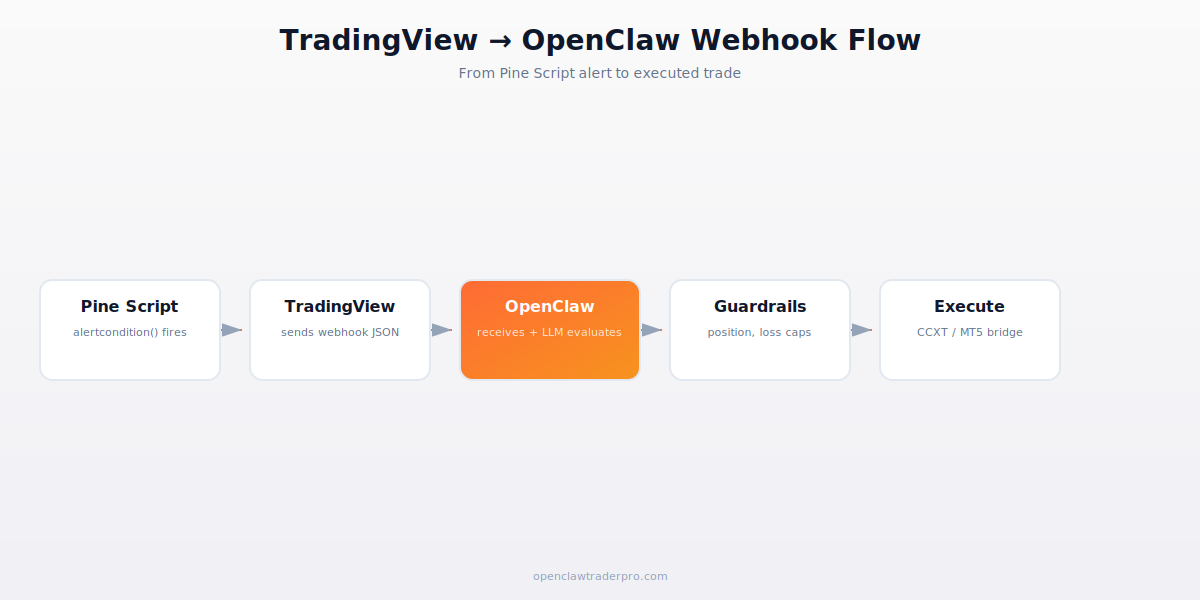
The key design principle: the TradingView signal is an input, not a command. OpenClaw's LLM receives the signal and evaluates it against current context (open positions, daily P&L, recent news) before deciding whether to act. This is the advantage over a direct TradingView-to-broker webhook — you get an intelligent gate between signal and execution.
Step 1 — Write the Pine Script alert
In TradingView's Pine editor, your strategy uses alertcondition() to define when a signal fires. A minimal example for an RSI-based signal:
//@version=5
indicator("RSI Signal", overlay=true)
rsi = ta.rsi(close, 14)
longCond = ta.crossover(rsi, 30)
alertcondition(longCond, title="RSI Long", message='{"action":"buy","symbol":"BTCUSDT","rsi":"oversold"}')
The message is JSON that OpenClaw will parse. Keep it structured — include the action, symbol, and any context the LLM should consider. Don't put position size in here; that's determined by your guardrails, not the signal.
Step 2 — Configure the TradingView alert
Right-click the chart → Add Alert. Set the condition to your alertcondition(). In the Notifications tab, enable Webhook URL and point it at your OpenClaw webhook endpoint (e.g., https://your-vps:8443/webhook/tradingview). This requires the TradingView Essential plan or higher — the free tier doesn't support webhook alerts.
Secure the webhook endpoint. Anyone who knows the URL can send fake signals. Use a secret token in the URL path or payload, validate it on the OpenClaw side, and use HTTPS. Never expose an unauthenticated webhook that can trigger trades.
Step 3 — Receive the webhook in OpenClaw
OpenClaw needs a webhook listener. The community webhook-receiver skill handles this, or you can run a lightweight listener that forwards to OpenClaw. Configure it to: (1) validate the secret token, (2) parse the JSON, (3) pass the signal to the LLM for evaluation.
Create a SKILL.md that handles incoming signals:
---
name: tv-signal-handler
description: "Evaluate TradingView webhook signals against strategy and risk rules."
trigger: "tradingview signal|webhook received"
permissions:
  - network
---
When a TradingView signal arrives:
1. Parse the JSON (action, symbol, context).
2. Check: is this symbol in my approved list? If not, ignore.
3. Check daily P&L. If < -5%, ignore and alert telegram.
4. Check open positions. If already in this position, ignore.
5. Evaluate the signal context against recent news/conditions.
6. If the signal still makes sense, compute position size (cap 1-2%).
7. Execute via CCXT, alert telegram on placement.
Step 4 — The guardrails gate
This is the most important part. The signal does not directly place a trade. It passes through guardrails (as in all our trading skills): approved-symbol check, daily-loss check, duplicate-position check, position-size cap. The LLM can also add judgment — if a 'buy' signal arrives but major bad news just broke, the LLM can decline. We cover the full guardrail philosophy in the hardening checklist.
Step 5 — Test before going live
Test the full chain in paper mode first: fire a manual TradingView alert, confirm OpenClaw receives it, confirm the LLM evaluates correctly, confirm guardrails work, confirm the (paper) execution happens. Watch the logs for the entire flow. Only after the chain works reliably in paper for a week should you connect live capital.
Common problems
- Webhook not received: check the URL, HTTPS certificate, and that your VPS port is open to TradingView's IPs (whitelist them).
- Signal fires too often: Pine Script alerts can fire per-bar or per-bar-close. Use 'Once Per Bar Close' to avoid intra-bar noise.
- LLM ignores valid signals: your SKILL.md rules may be too strict, or the JSON parsing failed. Check logs.
- Duplicate executions: add idempotency — track recently-processed signal IDs so a re-sent webhook doesn't double-trade.
📧 Get every new tutorial in your inbox
One email per week. Tutorials, CVE disclosures, broker updates. Unsubscribe in one click.
(Connect FluentCRM / ConvertKit / Beehiiv form here)
Frequently asked questions
Do I need a paid TradingView plan?
Yes, Essential ($15/mo) or higher for webhook alerts. The free tier doesn't support webhooks.
Why route through OpenClaw instead of direct to broker?
OpenClaw adds an intelligent gate — it evaluates the signal against context and risk rules before executing, rather than blindly acting on every signal.
Can the LLM override a signal?
Yes, by design. If a buy signal arrives but conditions have changed (bad news, daily loss hit), the LLM can decline. This is the value of the architecture.
Is the webhook secure?
Only if you secure it — secret token, HTTPS, IP whitelist. An unauthenticated webhook that triggers trades is a serious risk.
Can I use this for forex?
Yes. The execution layer becomes the MT5 bridge instead of CCXT. Same signal-evaluation flow.
What to read next
- TradingView vs MetaTrader
- TradingView Setup for OpenClaw Traders
- Telegram Bot Integration
- The 12-Point Hardening Checklist
Sources cited: The Hacker News (CVE-2026-25253 disclosure, Feb 2026); Conscia 2026 OpenClaw Security Crisis advisory; Snyk ToxicSkills study; Cyber Press ClawHavoc reporting; Wall Street Journal Polymarket profitability analysis (May 2026); Andrey Sergeenkov via The Defiant (April 2026); Akey, Grégoire, Harvie & Martineau, SSRN paper (March 2026); openclaw.ai official advisories; Peter Steinberger public statements on X. TradingView Pine Script and webhook documentation; OpenClaw skill documentation.