Affiliate disclosure: Links to brokers (Exness, Deriv, Binance, Bybit, OKX, IQ Option, Pocket Option, Quotex) may earn us a referral commission. Your costs don't change. Our ratings don't either. Binance links may earn us a referral commission. Risk disclosure: Independent research finds 70–84% of Polymarket traders lose money (Sergeenkov, April 2026; Akey et al., SSRN, March 2026). Forex CFDs: 70–85% retail loss rate. Binary options: 80%+ in most jurisdictions. AI agents don't change these baselines. Full disclaimer.
This guide walks you through setting up OpenClaw to trade on Binance's spot market — from creating an API key with the right permissions, to installing the right skills, to placing your first paper trade. We focus on spot trading because it's the safest entry point. Futures has its own dedicated guide.
Binance is the largest crypto exchange by volume globally and the default for most OpenClaw bots. Their API is mature, their documentation is good, and the CCXT skill supports them perfectly. Total setup time: about 25 minutes if you already have OpenClaw installed.
TL;DR — The 30-second answer
- Create a Binance API key with spot trading enabled, withdrawals disabled.
- Whitelist your VPS IP. Without it, the key works from anywhere — bad.
- Install the CCXT skill (or use the bundled
binanceskill). - Configure rate limits: Binance allows 1200 req/min. Stay under.
- Test with a 5 USDT order on testnet (
testnet.binance.vision) first. - Hard guardrails: position size cap, daily loss kill-switch, no withdrawal.
Step 1 — Create your Binance API key safely
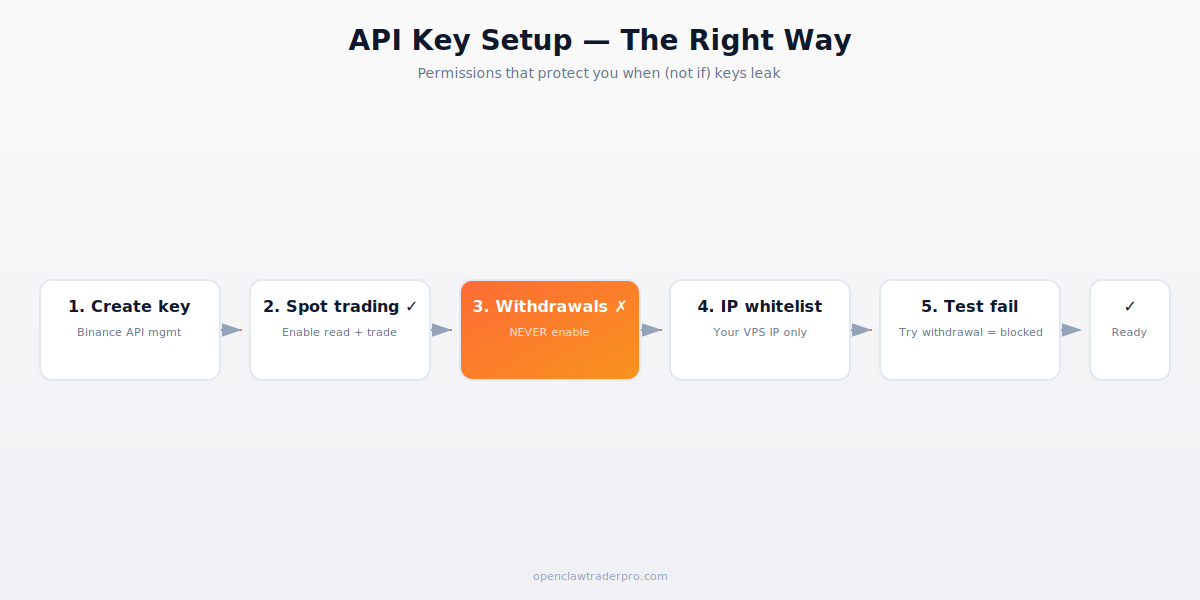
Log into your Binance account (web). Navigate to: Profile → API Management → Create API. Choose "System generated" (not HMAC). Name it something descriptive: "openclaw-bot-spot-vps1".
After the email confirmation, Binance shows you the API Key and API Secret. Save the secret immediately — Binance only displays it once. Lose it and you have to regenerate (which invalidates other configurations using it).
Now click Edit restrictions on the new key. The critical settings:
- Enable Reading: ON (always)
- Enable Spot & Margin Trading: ON
- Enable Withdrawals: NEVER ENABLE. If your VPS gets compromised, this is the only thing standing between an attacker and your balance.
- Enable Futures: OFF unless you specifically want futures (separate guide)
- Enable Universal Transfer: OFF unless needed for cross-account moves
Step 2 — Whitelist your VPS IP
In the same Edit restrictions page, find Restrict access to trusted IPs only. Add your VPS's public IP. Without this, an attacker who steals your API key can use it from anywhere; with it, they need to also compromise your VPS specifically.
Find your VPS IP: curl ifconfig.me from the VPS. Add to whitelist. Important: if you change VPS providers later, you'll need to update this. Many traders forget and wonder why their bot suddenly stops working.
Step 3 — Test the key permissions
Before installing skills, verify the key works as expected:
# Try a withdrawal attempt — should fail
curl -X POST 'https://api.binance.com/sapi/v1/capital/withdraw/apply' \
  -H "X-MBX-APIKEY: YOUR_KEY" -d 'coin=USDT&address=0x...&amount=1'

# Should return: "error: This API key has no permission to do this."
If withdrawal succeeded (unlikely if you followed step 1, but check), revoke the key immediately and recreate. Withdrawal permission is the single point of failure for the entire setup.
Then test that trading reads work:
curl 'https://api.binance.com/api/v3/account' -H "X-MBX-APIKEY: YOUR_KEY"
Should return your account state with balances. If you get a permission error, check that "Reading" was enabled.
Step 4 — Install the CCXT skill
clawhub install ccxt. Audit the SKILL.md first — it's in the official openclaw GitHub org with high trust. The CCXT skill wraps 120+ exchanges including Binance with a unified API.
Configure with your key:
openclaw config set ccxt.binance.api_key YOUR_KEY
openclaw config set ccxt.binance.api_secret YOUR_SECRET
openclaw config set ccxt.binance.testnet false  # true for testnet first
openclaw config set ccxt.binance.rate_limit 1100  # stay under 1200 cap
The secret goes into the OS keyring (macOS Keychain, Linux Secret Service, Windows DPAPI), not into plain text. Never expose secrets in shell history or logs.
Step 5 — Use testnet for first runs
Binance maintains testnet.binance.vision — a parallel exchange with fake money. Create separate API keys for testnet (it's a fully separate account). Set ccxt.binance.testnet=true and run a few orders to verify your setup works.
Testnet orders behave identically to live: same rate limits, same error messages, same order types. The only difference is no real money is at stake. Test for at least a few hours before flipping to live.
Step 6 — Build a hard-guarded trading skill
Create ~/.openclaw/skills/safe-binance-trade/SKILL.md:
---
name: safe-binance-trade
description: "Trade Binance spot with hard position and loss caps."
trigger: "buy|sell|binance trade"
permissions:
  - network
---
Before any order:
1. Get current USDT balance via ccxt.binance.fetch_balance().
2. Compute today's P&L by comparing to start_of_day_balance.
3. If P&L < -0.05 * start_of_day_balance: REFUSE order, alert telegram.
4. Compute position size. Cap at min(0.02 * total_balance, requested_size).
5. Place order via ccxt.binance.create_market_order() or create_limit_order().
6. Alert telegram on placement and fill.
7. Log to ~/.openclaw/logs/binance-trades.jsonl.
Step 7 — Operational best practices
- Use limit orders, not market. Market orders pay full spread; limit orders capture maker rebates and avoid slippage.
- Set time-in-force to GTX or IOC. Avoid orders sitting on the book for hours.
- Watch the rate limit. Binance returns 429 if you exceed 1200 req/min. Backoff with jitter, don't just retry immediately.
- Monitor account snapshot. Take daily balance snapshots to compute realistic P&L. Don't rely on the LLM to remember.
- Rotate API keys quarterly. Even with IP whitelist, periodic rotation limits damage from any unknown compromise.
Common errors and fixes
- "Invalid API-key": usually a typo. Re-copy from Binance. Check for trailing whitespace.
- "This API key has no permission": trading not enabled on the key, or the action requires withdrawal permission (which we never enable).
- "Filter failure: MIN_NOTIONAL": your order is below Binance's minimum (typically $10 USDT). Check symbol info first.
- "Filter failure: LOT_SIZE": your order size isn't a multiple of the step size. CCXT handles this automatically if used correctly.
- "Timestamp for this request is outside of the recvWindow": your VPS clock is drifting. Run
sudo ntpdate pool.ntp.org.
📧 Get every new tutorial in your inbox
One email per week. Tutorials, CVE disclosures, broker updates. Unsubscribe in one click.
(Connect FluentCRM / ConvertKit / Beehiiv form here)
Frequently asked questions
Can I trade futures with this setup?
Not with this guide. Futures has separate risks (liquidation, funding rates) and needs the futures permission enabled. See our dedicated futures guide.
How do I withdraw profits?
Manually, through the Binance web interface. The bot's API key cannot withdraw — that's by design.
What if my IP changes?
You'll need to update the IP whitelist in Binance. Order will fail until you do.
Should I enable margin trading?
Not initially. Margin adds leverage and liquidation risk. Master spot first.
How many concurrent bots can I run?
Each bot should have its own API key for proper rate limit tracking. Binance allows up to 30 API keys per account.
What to read next
- OpenClaw + Bybit Futures Tutorial
- Binance vs Bybit vs OKX for Bots
- CCXT Skill Deep Dive
- Hot Wallet Hygiene for Trading Bots
Sources cited: The Hacker News (CVE-2026-25253 disclosure, Feb 2026); Conscia 2026 OpenClaw Security Crisis advisory; Snyk ToxicSkills study; Cyber Press ClawHavoc reporting; Wall Street Journal Polymarket profitability analysis (May 2026); Andrey Sergeenkov via The Defiant (April 2026); Akey, Grégoire, Harvie & Martineau, SSRN paper (March 2026); openclaw.ai official advisories; Peter Steinberger public statements on X. Binance API documentation; CCXT library docs; OpenClaw bundled skills documentation.